Become an Author for this blog just by a Click

Followers

No of Visits

Site Meter
Page Rank
Check Google Page Rank

ppl online


Healthy Infos

How does SENSEX works?

Written By Anonymous on Monday, December 3, 2012 | 9:20 PM


How does SENSEX works?


Everybody knows about Sensex, but only a few knows how it works. The BSE SENSEX (Bombay Stock Exchange Sensitive Index),  free-float market capitalization-weighted stock market index of a few companies listed by the Sensex. Sensex is just a sensitive index where if a companies performance or value increases, its value will also be gradually increased. For this, first the company should be registered in the stock exchange board. For the registration, the company should follow certain rules and should also achieve certain percentage of the shares issued by them should be in the hands of public. The company should also have some years of experience in the market.

After being registered the company is provided with points based on their performance. Now the floated shares in the market are purchased by big companies. If there is a demand for their share in the market, their point grows. But if the demand becomes low, then their points fall. The shares can be traded by anyone in the market. Like this many companies get registered. The stock exchange board adds up all the points of the registered companies, and gives the sensex points.

Hope the above information is useful.Any comments,suggestions or queries is most appreciated. You can leave your comments below. Please take 5 seconds to share this post with your friends and families.

9:20 PM | 4 comments | Read More

VALUE OF $ INCREASES,RUPPEE FALLS !


VALUE OF $ INCREASES,RUPPEE FALLS !


How does the value of rupee fall?
The currency in your wallet is always on the move. But do you know as the value of dollar increases, the value of rupee falls?  The foreign exchange rate for conversion of currencies depends on the market scenario and the exchange rate being followed by the countries. Many factors contribute to this fall. "The recent fall in the rupee was mainly due to conditions in the euro zone, plunging stock markets, falling foreign investment inflows and strengthening of the dollar," says Brahmbhatt of Alpari.

The BSE SENSEX (Bombay Stock Exchange Sensitive Index),  free-float market capitalization-weighted stock market index of 30 companies listed by the Sensex. These 30 companies are some of the largest companies and are also representatives of the industrial sectors in the Indian economy. If the Sensex falls or crashes,gradually the value of Indian rupee also falls, which leads to instability in the Indian economy.
 Foreign Institutional Investors (FII) have shifted from the Indian markets during the financial year 2011. The FII’s lead to high influx of dollars into the Indian markets. FII in the developing markets has decreased considerably from 19.2 % in 2010 to 3.8% in the year 2011. As FII’s are taking out their investments from the Indian markets,it has led to increase in demand for the dollars, further leading to a fall in the value of the rupee.
European markets also contribute to the fall of the Indian Rupee. Global economy has become essential due to the European debt crisis. Due to the European debt crisis, foreign investors have considered dollar as a safe haven for their investments in their longer run. This again leads to demand for the dollars and a decrease in value of the rupee.

Hope the above information is useful.Any comments,suggestions or queries is most appreciated. You can leave your comments below. Please take 5 seconds to share this post with your friends and families.

9:15 PM | 0 comments | Read More

Google Is Now Using Social Media Websites,Site Speeds To Amend Your Blogs Rank

Written By Anonymous on Saturday, November 26, 2011 | 6:04 PM


Google started the Page rank system,based on links in the web to give related results to the users.There were many Page rank system before Google,but Google's Page rank system gave better and relevant results to the users.Google checks for more than 200 elements to give an amend and relevant searches to the users. A couple of elements are Social media and Site speed.


Social Media
Google has started to use Social media websites like Facebook and Twitter in ranking your Page or Blog.
Google checks for your tweets and also your bookmarks in Delicious.Since Facebook did not allow Google to get its data,Google has started its own Social network,the GOOGLE+.The +1 button in your blog also influences your rank.


Site Speed


Google is now checking for the Site Speed of your blog.The speed of which your blog loads is an important element in ranking your blog.If your blog is fast in loading, it means there are more visitors landing in your blog.The Site Speed report will tell you the speed of your blog.You can go to your account and click on the content section to view the Speed Site report.There are three tabs in it, Explorer, Performance, & Map Overlay.Explorer will give you the load time of the page.Performance will give you the site speed.Map overlay will give you the site speed experienced by people in different countries who are visiting your blog.


Hope the above information is useful.Any comments,suggestions or queries is most appreciated. You can leave your comments below. Please take 5 seconds to share this post with your friends and families.

6:04 PM | 3 comments | Read More

How will I automatically bookmark my blogs post in Delicious?

Written By Anonymous on Friday, November 25, 2011 | 4:21 PM

Bookmarking your blogs post will help you to get more visitors and traffic.Bookmark your blogs post in social bookmarking websites like Delicious etc.This in return will help to amend your blogs rank.Delicious is a social bookmarking website where you can store,save your blogs post.People who are in the social bookmarking website will see your bookmarks and tweets and there are chances to get more visitors to your blog.You can automatically bookmark your blogs post in delicious via twitter.


You can use Feedburners or Twitterfeed auto tweet to bookmark your blogs post.You can tweet your blogs post in twitter and they will      automatically bookmark it in Delicious.


NOTE: They wont bookmark your conversation with your Mom,friends etc as they will accept bookmark tweets with links.


You can go to Packrati.us and sign in there with your twitter account and you should grant the permission needed and they will check after your tweets frequently and will bookmark it in delicious.So after a few hours your tweet will be automatically bookmarked in Delicious.


Hope the above information is useful.Any comments,suggestions or queries is most appreciated. You can leave your comments below. Please take 5 seconds to share this post with your friends and families.


4:21 PM | 7 comments | Read More

How to keep your account safe from Facebook Hacks?

Written By Unknown on Sunday, November 20, 2011 | 5:07 PM


Hello Readers,


I think its been a month ago, I posted an article. I was held up with my exams and other issues. I was also thinking about some new topics to post here. When i logged in to my Facebook, I saw people posting these kind of pictures and some posts as mentioned below.


"HACKERS HAVE ALREADY ENTERED FACEBOOK AND THEY ARE PUTTING DIRTY VIDEOS IN YOUR NAME ON YOUR FRIENDS' WALLS OR PROFILES WITHOUT YOU KNOWING IT....YOU DONT SEE IT BUT OTHER PEOPLE CAN SEE IT .....AS IF THESE WERE A PUBLICATION THAT YOU MADE !!SO IF YOU RECEIVE IT FROM ME ITS NOT MINE.....(COPY THIS ON YOUR WALL) IT IS THE SECURITY OF YOUR OWN IMAGE.... do spread it ... Plz pass it on...EVEN I GOT FROM MANY OF MY FRIENDS>>SO BEWARE"


Then i thought of posting an article on the same. The Hackers starts from here. I keep seeing this "I have just completed my account verification" message in my feed.  It looks like this:

DO NOT CLICK THIS APPLICATION AND LOG IN. This is phishing scam, Which is not a real application. This application has been created by the hackers to hack your passwords and other information. 

Think about it--why would Facebook start deleting user accounts??
all these are pranks. Don't get cheated by this.

PLEASE PASS THIS ARTICLE LINK TO WARN OTHERS. LET OTHERS GET BENEFITED.

If you have already logged in to this application I'd recommend you to delete that account and have a new account. Make sure your Facebook password is not the same one you use for bank accounts, etc in connected to your Facebook email address for the new ones.

Hope the above information is useful.Any comments,suggestions or queries is most appreciated. You can leave your comments below. Please take 5 seconds to share this post with your friends and families.


5:07 PM | 0 comments | Read More

How To Change Title Tags In Blogger?

Written By Anonymous on Saturday, October 22, 2011 | 12:36 PM

Its always first name of the blog followed by the name of the post in your browser.This is by default.You should change this as you will get more search engine results.

Why Should I Change My Blogs Title?

Its important for you to change the title which will appear at the top  of the browser.If you don't change this, then there is a possibility of your blogs page rank decreasing. Since it is a habit of reading a text from left to right for everyone, you should have post title followed by the name of your blog.You can change the titles using Html codes.

How will I change the titles?

Here are few ways that I suggest for changing the title.

1) Go to Template---->Edit Html in your blogger dashboard.

2)Press CTRL+F and search for the tag <title><data:blog.pageTitle/></title>


3)Delete the tag and replace it with <b:if cond='data:blog.pageType == &quot;index&quot;'> <title><data:blog.title/></title> <b:else/> <title><data:blog.pageName/> | <data:blog.title/></title> </b:if>


4)Save your template and check for the results in your browser.


5)It will take a few days to change in the search engines,so be patient.


Hope the above information is useful.Any comments,suggestions or queries is most appreciated. You can leave your comments below. Please take 5 seconds to share this post with your friends and families if you like this post.


12:36 PM | 0 comments | Read More

How to add tag Cloud to your blog?

Written By Anonymous on Wednesday, October 12, 2011 | 2:25 PM

A widget is a simple gadget that will appear in your blog and this will add more flavour to your blog.You can have your own widgets by using HTML codes,Java etc.You can add anything you want in your widget like number of people online in your blog, weather report etc.

Here are few steps that I suggest  to create your own widget.

STEP 1)Add a Labels gadget in your blogger template. If you have already installed then ignore this step.
Go to Layouts and choose any column where you are about to install this new widget
Click on 'Add gadget' button and add the 'label gadget'.

STEP 2) Go to Template --->Edit HTML

NOTE:Click "Expand Widgets Template". It should be in tick mark

STEP 3)Search for <b:widget id='Label1' locked='false' title='Tags' type='Label'/>.If you have a different code then in your browser's search bar or tool search for  type='Label'.

STEP 4) After you search for  type='Label',delete the code in that line and replace with the codes given below.


<b:widget id='Label1' locked='false' title='Tags' type='Label'>
<b:includable id='main'> <b:if cond='data:title'> content' style='text-a<h2><data:title/></h2> </b:if> <div class='widget -lign: justify;'> /javascript'> <script type='tex t


//Settings / Variables
var max = 150; //max css size (in percent)var min = 70; //min css size (in percent) ue for yes, false for no var minCount = 1; // what is the minimumvar showCount = false; // show counts? t r count for a tag to be shown? 1 for all //Begin code: var range = max - min; //Build label Array e/>&quot;); </b:loop> //var labels = new Array(); <b:loop values='data:labels' var='label'> labels.push(&quot;<data:label.na mURLs var urls = new Array(); <b:loop values='data:labels' var='label'> urls.push(&quot;<data:label.url/>&quot;); </b:loop> b:loop> //Counts var counts = new Array(); <b:loop values='data:labels' var='label'> counts.push(&quot;<data:label.count/>&quot;); < / //Number sort funtion (high to low) function sortNumber(a, b) { return b - a;
}


//Make an independant copy of counts for sorting
var sorted = counts.slice();

ar most = sorted.sort(sortNu
//Find the largest tag count

vmber)[0];

//Begin HTML output
for (x in labels)
{
ch&quot; &amp;&amp; counts[x] >= minCount) { //Calculate textSize var textSize = min + Math.fl
if(x != &quot;peek&quot; &amp;&amp; x != &quot;forE
aoor((counts[x]/most) * range);
//Show counts?
if(showCount)
{
var count = &quot;(&quot; + counts[x] + &quot;)&quot;;
}else{
+ urls[x] + &quot;' styl
var count = &quot;&quot;;
}
//Output
document.write(&quot;<span style='font-size:&quot; + textSize + &quot;%'><a href='&quot
;e='text-decoration:none;'>&quot; + labels[x] + count + &quot;</a></span> &quot; );
}
}
</script>
<br/>
Widgets</a></span> </div> </b:includable> </b:widget>
<span style="font-size:80%;float:right;">Powered by <a href="http://www.vikiinfos.blogspot.com">Blogger


STEP 5) Now save your template and you are done.
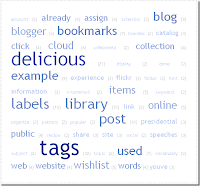
Check a new attractive tag cloud in your blog like this. Enjoy Blogging!!

Hope the above information is useful.Any comments,suggestions or queries is most appreciated. You can leave your comments below. Please take 5 seconds to share this post with your friends and families if you like this post.


2:25 PM | 2 comments | Read More

How To Add A Reply Option To Blogger Comments?

Written By Anonymous on Monday, October 3, 2011 | 10:31 PM

What will happen if an individual asks a question in a comment and another individual knows the answer for the question and if your blog doesn't have the option to reply button? Then it could crate a small chaos.Most of the blogs won't have the option to reply button. To eradicate this,I have few ways to solve it. 


STEP 1)In your dashboard go to Design---->'Edit Html'------>and check if the 'Expand Widget templates' box is selected


STEP 2)Find the code in your blogs source page(CTRL+ F and in the search bar find)


<data:commentPostedByMsg/>


 STEP 3)Paste the following codes below or after <data:commentPostedByMsg/> 


<a href='http://www.spiceupyourblog.com'><img alt='Best Blogger Tips' src='https://blogger.googleusercontent.com/img/b/R29vZ2xl/AVvXsEjvk-_3m-0BSUwfoFd7b21Wcqz_5bwMCMeFMBn47iVCIYvU_g-OZwW0s2u59BQCqoT4fY3FCCzz5z6qX4n-yUQr8WsW-nZGiroe6KcbkUGfvSB0LdJYF1l24BKZ1J5IYkxXeT8BIG8S1obp/s1600/best+blogger+tips.png'/></a><span class='comment-reply'><a expr:href='&quot;https://www.blogger.com/comment.g?blogID=YOUR-BLOG-ID&amp;postID=&quot; + data:post.id + &quot;&amp;isPopup=true&amp;postBody=%40%3C%61%20%68%72%65%66%3D%22%23&quot; + data:comment.anchorName + &quot;%22%3E&quot; + data:comment.author + &quot;%3C%2F%61%3E#form&quot;' onclick='javascript:window.open(this.href, &quot;bloggerPopup&quot;, &quot;toolbar=0,location=0,statusbar=1,menubar=0,scrollbars=yes,width=400,height=450&quot;); return false;'>[Reply to comment]</a></span><a href='http://www.bestbloggertemplates.net'><img alt='Best Blogger Templates' src='https://blogger.googleusercontent.com/img/b/R29vZ2xl/AVvXsEjvk-_3m-0BSUwfoFd7b21Wcqz_5bwMCMeFMBn47iVCIYvU_g-OZwW0s2u59BQCqoT4fY3FCCzz5z6qX4n-yUQr8WsW-nZGiroe6KcbkUGfvSB0LdJYF1l24BKZ1J5IYkxXeT8BIG8S1obp/s1600/best+blogger+tips.png'/></a>


NOTE: You must add your blogs Id for the gadget to display on the post.Your blogs Id is a number which will appear in the URL


To find your blogs Id go to the page form which you approach dashboard and copy your blogs ID from the notification bar.


STEP 4)Save your template and check for the option to reply button in your blog.


Hope the above information is useful.Any comments,suggestions or queries is most appreciated. You can leave your comments below. Please take 5 seconds to share this post with your friends and families if you like this post.


Source: spiceupyourblog

10:31 PM | 3 comments | Read More

Floating Back To Top Button For Blogger

Written By Anonymous on Saturday, October 1, 2011 | 10:02 PM


Many visitors or readers will wish to come to the top of the blog after reading the comments.If the article is long then it would create a problem for the readers.To solve this problem you can add a "GO TO TOP " button in your blog.The button will keep on sliding as the reader scrolls down and whenever the reader wants to go to the top of the page he can simply click on the button which enables him to go to the top of the page.


You can create this button by just adding some codes in Html. Here are the ways for adding the button.


STEP 1: Go to notepad and copy the codes given below in the notepad.


<a href='http:/www.vikiinfos.blogspot.com'><img alt='Best Blogger Tips' src='https://blogger.googleusercontent.com/img/b/R29vZ2xl/AVvXsEjvk-_3m-0BSUwfoFd7b21Wcqz_5bwMCMeFMBn47iVCIYvU_g-OZwW0s2u59BQCqoT4fY3FCCzz5z6qX4n-yUQr8WsW-nZGiroe6KcbkUGfvSB0LdJYF1l24BKZ1J5IYkxXeT8BIG8S1obp/s1600/best+blogger+tips.png'/></a><script type="text/JavaScript">
var topMargin = 300
var slideTime = 1200
var ns6 = (!document.all && document.getElementById);
var ie4 = (document.all);
var ns4 = (document.layers);
window.setInterval("main()", 10)

function floatObject() {
if (ns4 || ns6) {
findHt = window.innerHeight;
} else if(ie4) {
findHt = document.body.clientHeight;
}
}

function main() {
if (ns4) {
this.currentY = document.floatLayer.top;
this.scrollTop = window.pageYOffset;
mainTrigger();
} else if(ns6) {
this.currentY = parseInt(document.getElementById('floatLayer').style.top);
this.scrollTop = scrollY;
mainTrigger();
} else if(ie4) {
this.currentY = floatLayer.style.pixelTop;
this.scrollTop = document.body.scrollTop;
mainTrigger();
}

}
function mainTrigger() {
var newTargetY = this.scrollTop + this.topMargin
if ( this.currentY != newTargetY ) {
if ( newTargetY != this.targetY ) {
this.targetY = newTargetY
floatStart();
}
animator();
}


}
function floatStart() {
var now = new Date()
this.A = this.targetY - this.currentY
this.B = Math.PI / ( 2 * this.slideTime )
this.C = now.getTime()
if (Math.abs(this.A) > this.findHt) {
this.D = this.A > 0 ? this.targetY - this.findHt : this.targetY + this.findHt
this.A = this.A > 0 ? this.findHt : -this.findHt
} else {
this.D = this.currentY
}
}
function animator() {
var now = new Date()
var newY = this.A * Math.sin( this.B * ( now.getTime() - this.C ) ) + this.D
newY = Math.round(newY)
if (( this.A > 0 && newY > this.currentY ) || ( this.A < 0 && newY < this.currentY )) {
if ( ie4 )floatLayer.style.pixelTop = newY
if ( ns4 )document.floatLayer.top = newY
if ( ns6 )document.getElementById('floatLayer').style.top = newY + "px"
}
}
//-->
</script>
<div id="floatLayer" style="position: absolute; height:20px; width:15; left:650px; top:400px; z-index: 100"><a href="#"><img vspace="0" border="0" hspace="0" alt="Back to Top" src=
"https://blogger.googleusercontent.com/img/b/R29vZ2xl/AVvXsEifpGBDA7g5BbuL-5ivEJ3KvnuvnBwm6nEw-hFBnXzownbKCwk6WfIbMd489QOOLxF5hS_HYAJ1sYReanyDPs3Jz9YUbvGDsZSp6ZbGogQW-tiegC6jVlzsSeDI7-2upY3IBXU_CxE8dWQ5/s1600/TOP+BUTTON.gif" title="Back To Top Of Page" /></a></div><a href="http://vikiinfos.blogspot.com" target="_blank"><small>Blogger Top Gadget</small></a>


NOTE: If your button stops at the middle of the page then you have to increase the highlighted number which is at the start of the code.


LEFT 650px: How far from left the button should appear in your blog, you can change the number to your convenience.


RIGHT 400px: How far from top the button should appear in your blog, you can change the number to your convenience.


You can change the image of your button by changing the image URL which is highlighted in dark blue.


Step 2: Save your template and check it in your blog.


Hope the above information is useful.Any comments,suggestions or queries is most appreciated. You can leave your comments below. please take 5 seconds to share this post with your friends and families if you like this post.
10:02 PM | 0 comments | Read More

How to create a favicon for your blog?

A favicon also known as favorite icon is a small icon which appears in the navigation bar.The icon has a 32 x 32 or 16 x16 pixels.A favicon has .ico extension. But this appears only for certain blogs and websites.This favicon icon on the navigation bar won't change the blogs traffic by a huge margin but it will surely improve your blogs appearance. having a favicon icon for your blog will enable readers to bookmark your blog easily.


Here are few steps that I suggest for creating a favicon icon on the navigation bar for your blog or website.


1)Use ADOBE PHOTOSHOP:


Adobe photoshop cannot edit any .ico extension so you have to install a Windows Icon Photoshop Plugin.Once you have installed the Windows icon Photoshop create a 64 x 64 pixel canvas and design a favicon.After designing it you need to resize the image.Go to Image Size--->resample image.This ensures that the image doesn't blur. Now save it as a 16 x 16 image and give the name as "favicon.ico"


There is also an alternate way of creating a favicon icon that is by using Ms paint and web tools


2)Using  Ms paint and web tools and uploading favicon.ico file:


Since favicons are not very big files you can use MS PAINT to create a favicon.Create a JPEG image with 32 x 32 pixels with paint and convert the image into favicon.ico file by using "FAVICON FORM PICS"  in the internet service.Once you have converted the file you have to upload it in now your blog.upload it in the root directory of your blogs.The root directory is a directory where the index file is uploaded.


There are other simple ways to add a Favicon to your blogs. Just Go to this website and create a favicon for your blog. If you Cannot create one for yours there are so many existing favicon which u can use it for your blogs. just download the picture in the ico format and do the following


NOTE:The favicon file will work only if you upload it properly in the root directory.


The last step is just you have to add <link rel="shortcut icon" href="/favicon.ico" type="image/x-icon" /> in the header tag.


If you are undone, u can just go to Layout Tab. You will find favicon gadget and there will be an option called edit. click it and upload the image that you created or downloaded and then save it. 


Just go to your browser and check for the New favicon icon. 


Hope the above information is useful.Any comments,suggestions or queries is most appreciated. You can leave your comments below. please take 5 seconds to share this post with your friends and families if you like this post.

12:37 AM | 0 comments | Read More

How To Check Whether A Blog Is Dofollow Or Nofollow Without A Third Party's Help?

Written By Anonymous on Thursday, September 29, 2011 | 7:47 PM


What is a Do follow blog?


A blog which allows the search engine to follow the link. Such a blog is known as Do follow blog.Search engine websites like Google,Yahoo follow your blog and checks for your backlinks to increase your rank.Many blogs use link building process so their ranks get boosted up.If you use link building process for your blog you may get many visitors thus search engines will improve your rank and traffic.if you comment on a  dofollow blog then the search engine spiders will crawl on your link,thus improving your blogs rank.


What is a No follow blog?


A blog which doesn't allow the search engine spiders to crawl on the links.Such a blog is known as No follow blog. If you comment on a No follow blog then the search engine spiders wont identify your link and there will be no improvement in your rank nor in your traffic. When you comment on a no follow blog automatically a No follow attribute will be added. Now experts have now started removing No follow attribute to valuable comments and are now adding Do follow attribute.


Here are few steps that I suggest to check whether a blog is do follow or no follow without anyone's help


If you are a GOOGLE CHROME user then follow these steps.


1) Open Google Chrome
2)Type the blogs URL which you want to check in the search bar at the top and press enter.
3)Open a post and press CNTRL+U and view the source code of the page.
4)After the source code page opens press CNTRL+F
5)A search bar will appear in the right corner of the page, click on the search bar and type no follow.


NOTE: If the no follow attribute appears in the commenting section then the blog is no follow if it doesn't appear then it is do follow.


If you are an INTERNET EXPLORER user then follow these steps.


1)Open Internet Explorer.
2)Type the blogs URL which you want to check in the search bar at the top and press enter.
3)Right click at the page and click on View-----> source.
4)A source code window will open.
5)Press CNTRL+F.
6)Type no follow in the source code page.


If you are a FIREFOX user then follow these steps.


1)Open Firefox.
2)Type the blogs URL which you want to check in the search bar at the top and press enter.
3)Open any post.
4)Go to the menu bar and click on View--->source
5)After the source code page opens press CNTRL+F
6)A search bar at the bottom of the page will get opened and in that type no follow and search in source code page.


Hope the above information is useful to all  users.You are free to throw your queries and comments at the bottom.


7:47 PM | 2 comments | Read More

From the Author's Desk


Vignesh, the founder of VikiInfos, is a Commerce Graduate and Pursuing his Chartered Accountant Profession, now in the Intermediate level. Blogging is his hobby and likes to share things. He plans to Update this blog with latest happenings and things that he gets to know at times and worthy information.a friendly user blog can be followed by any person. Join us free and subscribe.
Feel free to say hi to me, or follow @vikiinfos on twitter.


Support US to support YOU!
Dono How To Donate? Click here
Creative Commons License
Healthy Infos... by Vignesh is licensed under a Creative Commons Attribution-NoDerivs 3.0 Unported License.
Based on a work at vikiinfos.blogspot.com.
 
Twitter Bird Gadget